源码学习
以下方的示例代码来阐述 Leaflet 执行流程
const map = L.map("map", {}).setView([51.505, -0.09], 13);L.tileLayer("https://tile.openstreetmap.org/{z}/{x}/{y}.png").addTo(map);初始化
map 对应内部方法 createMap,返回一个 Map 实例
export function createMap(id, options) { return new Map(id, options);}Map 类是一步步继承而来的,追溯其源是 Class 类
export class Class {  // 继承函数  static extend({ statics, includes, ...props }) {}
  // ......
  constructor(...args) {    // ......
    if (this.initialize) {      this.initialize(...args);    }
    this.callInitHooks();  }}
Evented 继承自 Class ,其内部定义了事件处理机制
// 拥有了处理事件的能力export const Evented = Class.extend(Events);Map 类继承自 Evented,其在执行构造函数时,执行 initialize 时(在 Class 类中定义),Map 类的 initialize 函数主要步骤如下
export const Map = Evented.extend({  // 预设参数  options: {    crs: EPSG3857,
    // ......  },
  initialize(id, options) {    options = Util.setOptions(this, options);
    // ......
    this._initContainer(id);
    this._initLayout();
    this._initEvents();
    // 此处未传值 center,在 setView 阐述该流程    if (options.center && options.zoom !== undefined) {      this.setView(toLatLng(options.center), options.zoom, { reset: true });    }
    // 此处未传值 layers,在 addTo(map) 阐述该流程    this._addLayers(this.options.layers);  },
  // ......});
各个步骤详细如下
参数合并
外部参数由 L.map 执行时传入(也可以不传),以 options 的值覆盖 this.options 的值
初始化 Container
根据 L.map 执行时传入 id 获取 DOM 元素,后
- 给元素绑定滚动事件,让其不可以滚动
- 给元素设置唯一表示,属性为 _leaflet_id
_initContainer(id) {  // 获取容器  const container = (this._container = DomUtil.get(id));
  // ......
  // DomEvent.on是Leaflet自定义的事件监听机制  DomEvent.on(container, "scroll", this._onScroll, this);
  // 容器唯一标识  this._containerId = Util.stamp(container);}
初始化 Layout
根据不同的条件,给容器 DOM 设置 CSS 类名,以兼容不同的场景
_initLayout() {  const classes = ["leaflet-container"];
  if (Browser.touch) {    classes.push("leaflet-touch");  }
  // ......
  container.classList.add(...classes);
  // ......
  this._initPanes();}
初始化 Pane
初始化各个元素空间的基准面,通过 CSS z-index 来控制优先级
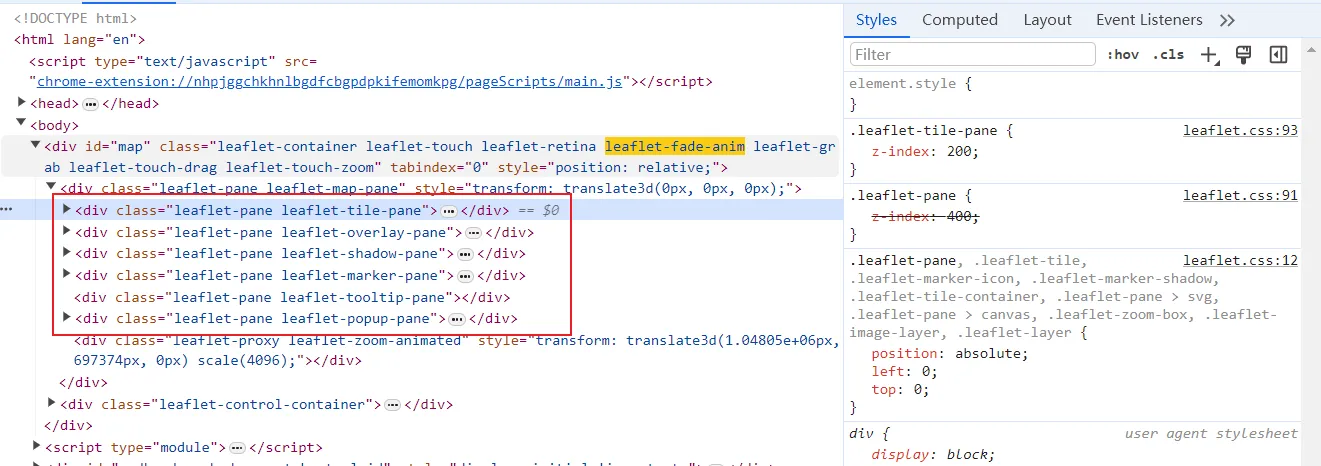
_initPanes() {  this._mapPane = this.createPane("mapPane", this._container);
  // ......
  // 创建 DOM 元素,以 name + css 类名 来控制优先级(z-index)  this.createPane("tilePane");
  this.createPane("overlayPane");
  // ......}
初始化事件
在容器 DOM 绑定事件,如 click,dblclick 等等,并监听容器的大小改变
_initEvents(remove) {  // ......
 // 绑定或解除绑定事件  onOff(    this._container,    "click dblclick mousedown mouseup " +      "mouseover mouseout mousemove contextmenu keypress keydown keyup",    this._handleDOMEvent,    this  );
  // ......
  if (this.options.trackResize) {    if (!remove) {      if (!this._resizeObserver) {        this._resizeObserver = new ResizeObserver(this._onResize.bind(this));      }      this._resizeObserver.observe(this._container);    } else {      this._resizeObserver.disconnect();    }  }}
定位到某个位置
不考虑移动的动画,直接定位到某个位置。setView 函数主要步骤如下
setView(center, zoom, options) {  zoom = zoom === undefined ? this._zoom : this._limitZoom(zoom);
  center = this._limitCenter(toLatLng(center), zoom, this.options.maxBounds);

  // 参数设置  options = options || {};
  //  this._resetView(center, zoom, options.pan && options.pan.noMoveStart);}
各个步骤详细如下
计算中心点
计算中心点,根据传入的最大包围盒来计算聚焦的中心点
_limitCenter(center, zoom, bounds) {    const centerPoint = this.project(center, zoom),    viewHalf = this.getSize().divideBy(2),    viewBounds = new Bounds(      centerPoint.subtract(viewHalf),      centerPoint.add(viewHalf)    ),    offset = this._getBoundsOffset(viewBounds, bounds, zoom);

    if (Math.abs(offset.x) <= 1 && Math.abs(offset.y) <= 1) {      return center;    }
    return this.unproject(centerPoint.add(offset), zoom);}
参数设置
options = options || {};
// ......
if (options.animate !== undefined) {  options.zoom = Util.extend({ animate: options.animate }, options.zoom);
  options.pan = Util.extend(    { animate: options.animate, duration: options.duration },    options.pan  );}
动画
判断是否要执行动画,此处暂时不考虑动画
// ......
const moved =  this._zoom !== zoom    ? this._tryAnimatedZoom && this._tryAnimatedZoom(center, zoom, options.zoom)    : this._tryAnimatedPan(center, options.pan);
if (moved) {  // prevent resize handler call, the view will refresh after animation anyway  clearTimeout(this._sizeTimer);  return this;}
_resetView
_resetView(center, zoom, noMoveStart) {  // 将 map-pane transform 归零  DomUtil.setPosition(this._mapPane, new Point(0, 0));
  // zoom 限制判断,判定当前zoom是否可到达(minZoom和maxZoom)  zoom = this._limitZoom(zoom);
  // 发送 viewprereset 事件  this.fire("viewprereset");
  // 根据判断,发送 zoomstart 和 movestart 事件  this._moveStart(zoomChanged, noMoveStart)
  // 关键函数,单独阐述  ._move(center, zoom)
  // 根据判断,发送 zoomend 和 moveend 事件  ._moveEnd(zoomChanged);}
_move
关键函数,根据 center 计算投影后的坐标(地理坐标 -> 投影坐标)
_move(center, zoom, data, supressEvent) {  this._zoom = zoom;  this._lastCenter = center;
  // 根据投影计算位置  this._pixelOrigin = this._getNewPixelOrigin(center);}
_getNewPixelOrigin
_getNewPixelOrigin(center, zoom) {  const viewHalf = this.getSize()._divideBy(2);
  return this.project(center, zoom)    ._subtract(viewHalf)    ._add(this._getMapPanePos())    ._round();}
// ......
project(latlng, zoom) {  zoom = zoom === undefined ? this._zoom : zoom;  return this.options.crs.latLngToPoint(toLatLng(latlng), zoom);}
至此 Map 的核心方法讲述完毕,投影和瓦片都是外部引入的,会单独阐述
坐标转换
crs(Spatial reference system) 默认值为 EPSG3857,Leaflet 坐标转换分为两个步骤
投影
将 经纬度 -> 米,根据投影公式,将地理坐标转换为投影坐标
变换
将 米 -> 像素,分为如下两个步骤
坐标修正
根据【投影坐标系】和【瓦片坐标系】原点的不同,进行坐标修正。
计算
根据修正后的投影坐标和缩放层级,就可以计算出当前点的像素位置,这是 GridLayer 的核心功能
加载瓦片
根据 TileLayer 一些列方法去加载需要展示的瓦片,这是 TileLayer 的核心功能,并放置于正确的位置