CommonJS
CommonJS
什么是 CommonJS
CommonJS 是一套 Javascript 模块规范,我们常说的 CommonJS 指的这一套规范,而不是某个新的框架,新的语言,新的解释器,它仅仅是一个规范、标准
CommonJS 是越来越多的标准集合,其中包含
- Modules
- Binary strings and buffers(二进制字符串和 Buffer)
- Charset encodings(编码)
- Binary, buffered, and textual input and output (io) streams (二进制、Buffer 以及文本 I/O 流)
- System process arguments, environment, and streams(系统进程参数、环境、流)
- File system interface(文件系统接口)
- Socket Stream
- Unit test assertions, running, and reporting(测试、断言)
- Web server gateway interface, JSGI(WEB 服务器网关)
- Local and remote packages and package management(本地包和远程包的管理 …)
为什么会出现 CommonJS
在 ES6 后,Javascript 有了自己的模块规范 ES Module,但是在当时是缺乏普遍可接受的模块机制,CommonJS 应运而生
CommonJS API 将通过定义满足许多常见应用程序需求的 API ,来提供与 Python,Ruby 和 Java 一样丰富的标准库。目的是使应用程序开发人员能够使用 CommonJS API 编写应用程序,然后在不同的 JavaScript 解释器和主机环境中运行该应用程序。在与 CommonJS 兼容的系统中,可以使用 JavaScript 编写
- 服务端 Javascript 应用程序
- 命令行工具
- 桌面 GUI 应用
- 混合应用
值得一提的是,CommonJS 不仅仅可以在服务端使用,也可以在_浏览器、桌面端使用_,可能是因为 Node 太火了,所以导致很多人都认为 CommonJS 只能运行于服务端。例如 browserify 就可以运行于浏览器
这个项目由 Mozilla 工程师 Kevin Dangoor 于 2009 年 1 月发起,最初名为 ServerJS。在 2009 年 8 月,这个项目被改名为“CommonJS”来展示其 API 的广泛的应用性。有关规定在一个开放进程中被创建和认可,一个规定只有在已经被多个实现完成之后才被认为是最终的。 CommonJS 不隶属于致力于 ECMAScript 的 Ecma 国际的工作组 TC39,但是 TC39 的一些成员参与了这个项目
CommonJS 优势
- CommonJS 一个文件即为一个模块,模块内定义的变量、函数…等都是私有的
- 作用域隔离,不同模块命名不会冲突,且如果不是如下写法,不会污染全局作用域
a = 2; // 非严格模式下,不声明直接使用global.b = 3; // 全局变量直接赋值
var c = 2; // 这样写在浏览器端会污染全局作用域,但node不会- 模块按照代码出现的顺序加载,不需要再考虑 script 先后加载顺序,从而导致依赖无法找到的问题
- 文件缓存,模块重复使用
- 强大的包管理
CommonJS 和 Node
如上所知,CommonJS 是一个规范,Nodejs 是 CommonJS 规范的一种实现,但是 Nodejs 并非完全按照 CommonJS 去实现
在 2013 年 5 月,Node.js 包管理器 npm 的作者 Isaac Z. Schlueter,宣布 Node.js 已经废弃了 CommonJS,Node.js 核心开发者应避免使用它。Breaking the CommonJS standardization impasse
请注意,接下来会用 Nodejs 来介绍 CommonJS,所有代码、源码都基于 node v12.12.0
如何定义一个模块
在 node 中,每一个文件就是一个模块,如下代码所示
const a = 1;它就是一个模块,每个模块都是 Module 的实例,那什么是 Module?
值得一提的是,无论你在 “a.js” 文件内 是否使用 exports/module.exports,它都是一个模块。这一点和 typescript 有一丢丢区别,typescript 如果不使用 import/export 的话就认为是个 script 而非 module
In TypeScript, just as in ECMAScript 2015, any file containing a top-level import or export is considered a module. Conversely, a file without any top-level import or export declarations is treated as a script whose contents are available in the global scope (and therefore to modules as well).
Module
Module 的构造函数定义如下
function Module(id = '', parent) { this.id = id; // 模块唯一标识,一般为模块的绝对路径(除开main,main模块的id为".") ... this.exports = {}; // 模块对外输出的值 this.parent = parent; // 父模块,如果为main模块,则父模块为null ... this.filename = null; // 文件名,文件的绝对路径 this.loaded = false; // 文件是否加载完毕 this.children = []; // 子模块}Node 中 每个模块都是 Module 的实例,表现为 const module = new Module(filename, parent);
这里值得一提的是,模块内部会提供一些对象,例如 _require,module,exports,_filename,dirname,这些都可以在模块内直接使用。还有一些例如 setTimeout、setInterval 也可以在模块内直接使用,但他们完全不同,setTimeout、setInterval 是挂载于 global(全局对象) 上,所以可以全局使用,而 require… 不是挂载于 global 上的全局属性、方法,至于他们是如何产生的,下面会详细讲解
如何在模块内对外输出数据
在模块内部,可通过 exports、module.exports 对外部输出数据,如下代码所示
exports.a = 1;module.exports.a = 1;exports、module.exports
exports 为 Module 实例的 exports 属性,表现为 const exports = module.exports;
以下两点值得注意
- 当 exports 未重新赋值时,如下使用
exports.name = 2;,exports 和 module.exports 完全相等 - 当 exports 重新赋值时,如下使用
exports = {};,exports 和 module.exports 不相等
请注意,无论 exports 如何变化,无论指向谁,模块对外输出的数据永远是 module.exports,如下代码所示
Module._load = function (request, parent, isMain) { { ... return cachedModule.exports; } ... { ... return cachedModule.exports; } ... return module.exports;};可以看到 Module._load 返回值全部为 module.exports,所以不管 exports 如何变化,模块对外输出的都是 module.exports
如何加载模块
可以使用 require 函数来加载其他模块,如下代码所示
const a = require('./b.js');加载完毕后,require 函数返回 b.js 模块的 exports 属性
require
require 函数定义如下
Module.prototype._compile = function (content, filename) { ... const require = makeRequireFunction(this, redirects); ...}require 函数主要用来加载模块,表现为 const mod = require(modulePath),加载完成后,返回模块的 exports 属性,表现为 mod = module.exports
require 流程
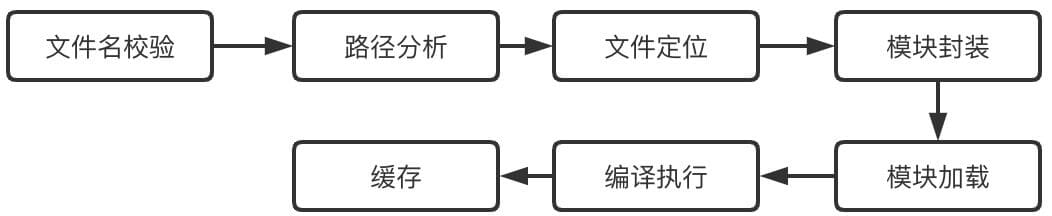
由于此文不是主要分析模块加载,而是分析整个流程,所以不会对 require 详细分析,如下注意事项
- 不会从主模块开始分析,即不会分析 Module.runMain,而是直接分析 require
- 不会分析 makeRequireFunction 函数,而是直接取其中的核心代码 Module.prototype.require
function makeRequireFunction(mod, redirects) { ... require = function require(path) { return mod.require(path); // Module.prototype.require }; ...}- 不分析路径分析和文件定位
- 不分析缓存,即认为是第一次加载模块
- 不分析 Native Module,只分析 File Module
以下流程分析,从如下 demo 着手
require('./b.js');exports.b = 1;文件名校验
Module.prototype.require = function (id) { validateString(id, 'id'); // 校验传入文件名是否为字符串,./b.js 是字符串 ... return Module._load(id, this, /* isMain */ false); ...};路径分析、文件定位
此处不分析_路径分析_和_文件定位_,这个node 文档有详细的说明,会也在《node 模块加载》一文中详细分析
模块封装
Module._load = function (request, parent, isMain) { ... const module = new Module(filename, parent); // 生成module实例,这也就是为什么说每个模块都是 Module 的实例 ...};模块加载
Module._load = function (request, parent, isMain) {  ...  module.load(filename); // Module._load => Module.prototype.load  ...};
Module.prototype.load = function (filename) {  ... this.filename = filename; // 赋值 filename this.paths = Module._nodeModulePaths(path.dirname(filename)) // 赋值paths const extension = findLongestRegisteredExtension(filename); // 确定当前模块的文件类型,默认为.js  ...};
编译执行
此处进入模块的关键流程,编译+执行
Module.prototype.load = function (filename) { ... Module._extensions[extension](this, filename); // Module.prototype.load => Module._extensions['.js'] this.loaded = true; ...};step1 根据文件类型,去执行相应的方法编译
*.js -> 以 module._compile 加载*.json -> 以 JSON.parse 加载*.node -> 以 process.dlopen 加载*.mjs -> throw new ERR_REQUIRE_ESM(filename)对于 .js 来说,运行如下代码
Module._extensions[extension](this, filename) => Module._extensions[.js](this, filename);
Module._extensions['.js'] = function (module, filename) {  ...  const content = fs.readFileSync(filename, 'utf8'); // 使用 fs API 读取文件内容  module._compile(stripBOM(content), filename); // stripBOM 删除字节顺序标记,并进入 module._compile};
step2 进入 Javascript 模块编译阶段
Module.prototype._compile = function (content, filename) { ... compiled = compileFunction( content, filename, 0, 0, undefined, false, undefined, [], ['exports', 'require', 'module', '__filename', '__dirname'] ); ... compiledWrapper = compiled.function; // compiledWrapper 就是我们最终想要的函数};调用 compileFunction,compileFunction 方法定义于 “node-master/src/node_contextify.cc”,如下代码所示
void ContextifyContext::CompileFunction(const FunctionCallbackInfo <Value> &args) {  // params 就是 compileFunction 传的  ['exports', 'require', 'module', '__filename', '__dirname']  // source 就是 content  ...  Local <ScriptOrModule> script;  MaybeLocal <Function> maybe_fn = ScriptCompiler::CompileFunctionInContext(      parsing_context, &source, params.size(), params.data(),      context_extensions.size(), context_extensions.data(), options,      v8::ScriptCompiler::NoCacheReason::kNoCacheNoReason, &script);
  ...
  // 经过 ScriptCompiler::CompileFunctionInContext 生成函数句柄  Local <Function> fn = maybe_fn.ToLocalChecked();
  ...
  // 创建 result 对象句柄 const result = {};  Local <Object> result = Object::New(isolate);
  // result.function = fn;  if (result->Set(parsing_context, env->function_string(), fn).IsNothing())return;
  // result.cacheKey = cache_key;  if (result->Set(parsing_context, env->cache_key_string(), cache_key).IsNothing())return;
  // 返回 result  args.GetReturnValue().Set(result);}
compileFunction 返回对象 compiled = { function: compiledWrapper, cacheKey: yy }
拿 b.js 举例来说,compiledWrapper 函数如下所示
exports.b = 1;
// 编译为 =======>
function compiledWrapper(exports, require, module, __filename, __dirname) { exports.b = 1;}有没有觉得很熟悉了,exports, require, module, **filename, **dirname 出现了,因为它们是模块外层函数的参数,所以我们可以在模块内(函数内)使用,所以说它们与_setTimeout、setInterval_ 完全不同
stpe3 编译完成后,准备执行参数
... const dirname = path.dirname(filename); const require = makeRequireFunction(this, redirects); // 暂时不分析 makeRequireFunction var result; const exports = this.exports; // 所以说 exports = module.exports const thisValue = exports; const module = this;stpe4 运行
...// 由于call传入thisArgs参数为thisValue,所以模块内部顶级作用域的 this === exports === module.exports// 所以你可以使用 this 来对外输出值,但不建议
result = compiledWrapper.call( thisValue, exports, require, module, filename, dirname);...this.b = 1; // 顶级作用域,可以使用 this 赋值,对外输出数据,但不建议缓存
Module._load = function (request, parent, isMain) { ... Module._cache[filename] = module; // 根据模块绝对路径进行缓存 ... // module.load(filename); ... return module.exports;};讲真,Module._cache[filename] = module; 其实运行前于 module.load(filename),但还是将缓存放在了最后一步,感觉比较符合正常思维
至此为止,require 加载完毕,并返回了 module.exports 的值
CommonJS 优势解释
模块内定义变量、函数…为私有
由于存在 compiledWrapper 函数,模块代码运行于 compiledWrapper 函数中,由于作用域的关系,外部作用域无法访问 compiledWrapper 函数内的变量、函数…
作用域隔离,不同模块命名不会冲突
由于每个模块都包裹于 compiledWrapper 函数中,且每个 compiledWrapper 函数是不相同的,由于作用域的关系,不同模块命名不会冲突
由于存在 compiledWrapper 函数,处于模块顶层的变量并不是在全局作用域中声明,而是在 compiledWrapper 作用域内,所以不会污染全局变量,这点和浏览器有区别
模块按照代码出现的顺序加载,不需要再考虑 script 先后加载顺序
由于 require 为同步加载,先调用的 require 自然先加载完毕,所以不会存在先后加载顺序问题
文件缓存
Module._load = function (request, parent, isMain) {  ...  const filename = Module._resolveFilename(request, parent, isMain); // 此处也会判断缓存
  const cachedModule = Module._cache[filename];
// 如果有缓存的话,直接返回缓存的exports if (cachedModule !== undefined) { updateChildren(parent, cachedModule, true); return cachedModule.exports; } ...}在缓存步骤时,模块以_key=模块绝对路径_,_value=Modue 实例_存入 Module._cache 中,此时在第二次加载时,会根据模块绝对路径查询,如果存在缓存,则直接返回缓存的 cachedModule.exports,无需再次编译执行
_resolveFilename _resolveFilename 方法其实也存在缓存,Module._pathCache = Object.create(null),虽然_pathCache 确实是缓存,但这边不是关键,所以未分析
强大的包管理
在《npm》文章再分析
CommonJS 常见问题
为什么 CommonJS 不太适合运行于浏览器
ans. 1 根据本文以上内容,CommonJS 有几个比较关键的对象 module(Module),exports,require,但浏览器并不存在这几个对象,那么必然的浏览器无法使用 CommonJS
ans.2 既然不存在这几个对象,创建这几个对象不就得了。举个例子来说,不存在 require 方法,可以自己捣鼓一个嘛,这样 CommonJS 不就可以运行于浏览器了嘛
// 假装这是一个合格的require方法function require() { ...}那么问题来了,CommonJS 就真得适合运行于浏览器吗?
拿 browserify 来说,browserify 可以让遵从于 CommonJS 规范的包运行于浏览器,但 browserify 始终无法避免 CommonJS 的同步加载问题,并且当代码量增多时,browserify 打出来的包会非常大,当单个包非常大时,还是同步的话…会被扣绩效的
举个例子,代码如下所示
const crypto = require('crypto');
function createMD5(str) {  return crypto.createHash('md5').update(str).digest('hex');}
exports.f = f;browserify ./main.js > bundle.js // 看下 bundle.js有多大,我打出来大概 811KB打开 bundle.js,发现我只是想使用 crypto.createHash 方法,但必须等待 crypto 包加载完成,考虑到网络下载成本和 Javascript 执行成本,不是很可取
AMD
哪里有需求,哪里就有轮子,AMD 应运而生。AMD(Asynchronous Module Definition)采用异步方式加载模块,模块的加载不影响它后面语句的运行,所有依赖这个模块的语句,都定义在一个回调函数中,等到加载完成之后,这个回调函数才会运行
require.js
require.js 是 AMD 的一种实现,主要解决如下两个问题
- 实现 Javascript 文件的异步加载,避免同步使网页失去响应
- 依赖管理
- 支持 CommonJS 模块
//Calling define with a dependency array and a factory functiondefine(['dep1', 'dep2'], function (dep1, dep2) {  //Define the module value by returning a value.  return function () {};});
// 也支持CommonJS模块进行简单包装define(function (require) {  var dependency1 = require('dependency1'),    dependency2 = require('dependency2');
  return function () {};});
其他的见 requiredjs 文档
CommonJS 和 ES Module 异同
编译时还是运行时
- ES Module 编译时加载,import 为静态命令形式,所以可以进行 tree shake 优化
- CommonJS 运行时加载
作用域
- ES Module 必须处于顶级作用域
- CommonJS 没有要求
import xx from yy; // ok
function wrapper(){  import xx from yy; // error  import(zz); // ok 当然 import() 是可以的
  require(zz); // ok}
严格模式
- ES Module 自动为严格模式
- CommonJS 需指定严格模式,否则为非严格模式
模块名是否可以使用变量
- ES Module 由于是编译时加载,所以不可以使用变量
- CommonJS 由于是运行时加载,所以可以使用变量
import xx; // ok
const xx = yy;import xx; //errorimport(xx); // ok
require(xx); // ok
导入模块的方式,引用还是拷贝
- ES Module 加载的是模块的引用,模块后续变化会产生影响
- CommonJS 加载的是模块的拷贝,module.exports,模块第一次加载后,后续所有加载都是从缓存读取
ES Module
import { b } from './b';
console.log(b); // 1
setTimeout(() => { console.log(b); // 2}, 2000);export let b = 1;setTimeout(() => { b = 2;}, 1000);CommonJS
const { b } = require('./b');
console.log(b); // 1
setTimeout(() => { console.log(b); // 1}, 2000);let b = 1;exports.b = b;setTimeout(() => { b = 2;}, 1000);循环依赖的处理方式
- ES Module 无需解决循环引用的问题,只需要在模块使用时能找到即可
- CommonJS 需要解决循环引用的问题,具体等到《模块加载》分析
commonjs-effort-sets-javascript-on-path-for-world-domination node-master commonjs.org CommonJS 规范 为什么选择 AMD? typescript-Modules